Welcome To DWT Listing Theme
-
All Locations :

Welcome To DWT Listing Theme
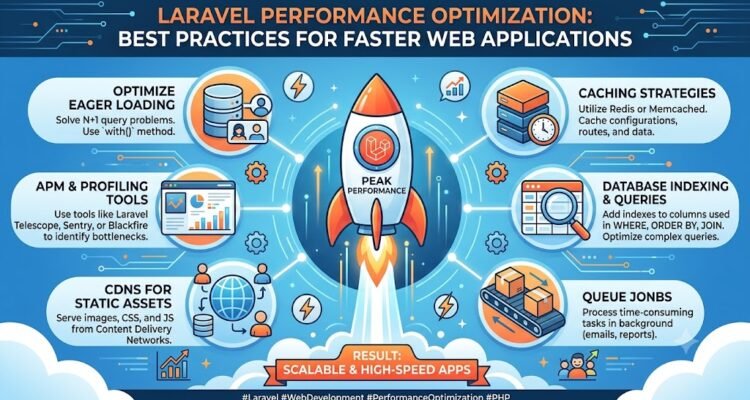
Laravel has become one of the most popular PHP frameworks thanks to its elegant syntax, robust ecosystem, and developer-friendly architecture. From startups to enterprise applications, businesses rely on Laravel to build secure and scalable web solutions. However, as applications grow, maintaining speed and responsiveness becomes increasingly challenging. This is where Laravel performance optimization plays a critical role.
A fast Laravel application doesn’t just improve the user experience—it also reduces server load, supports scalability, and helps businesses deliver reliable digital services. In this guide, we’ll explore practical techniques to optimize Laravel applications and explain why performance should be part of every development strategy.
Users expect web applications to respond instantly. Slow-loading dashboards, delayed API responses, and sluggish pages can negatively impact engagement and productivity.
Optimizing a Laravel application provides several long-term benefits:
Performance optimization is not a one-time task. It should be integrated into the development lifecycle to ensure applications remain efficient as new features are added.
Laravel includes several commands designed to improve application performance in production environments.
Developers should regularly optimize:
Caching these resources minimizes unnecessary processing and allows Laravel to respond to requests more efficiently.
Database performance is one of the biggest factors affecting Laravel applications.
Common optimization techniques include:
The N+1 query problem can significantly slow down applications. Eager loading retrieves related data in fewer queries, reducing database overhead.
Proper database indexing speeds up search operations and reduces execution time for complex queries.
Avoid retrieving unnecessary columns. Returning only the data needed improves query performance and reduces memory usage.
Regularly reviewing query execution times helps identify bottlenecks before they impact users.
Caching is one of the most effective methods of Laravel performance optimization.
Laravel supports multiple caching drivers, allowing developers to store frequently accessed data instead of generating it repeatedly.
Common caching strategies include:
Efficient caching significantly reduces response times while lowering database load.
Even a well-optimized backend can appear slow if front-end resources are too large.
Developers should:
Smaller assets improve loading speed across both desktop and mobile devices.
Application performance depends not only on Laravel but also on the hosting environment.
Consider:
Proper server configuration allows Laravel applications to handle higher traffic with fewer resources.
Long-running operations can delay user responses.
Laravel Queues allow developers to move tasks such as:
Processing these tasks asynchronously keeps the application responsive while improving overall performance.
Many Laravel applications serve APIs for mobile apps and third-party integrations.
To improve API performance:
Fast APIs create better experiences for developers and end users alike.
Performance optimization requires continuous monitoring rather than occasional testing.
Useful metrics include:
Regular monitoring helps identify performance issues before they affect production environments.
Many businesses use a dedicated Laravel speed optimization package to automate repetitive optimization tasks and simplify performance management.
When evaluating a package, look for features such as:
The right solution should reduce manual effort while supporting long-term application growth.
Even experienced developers can overlook issues that gradually reduce performance.
Some of the most common mistakes include:
Addressing these issues early helps maintain consistent performance as applications scale.
As web applications become increasingly dynamic, performance optimization should evolve alongside new technologies.
Modern optimization strategies combine:
Businesses that prioritize these areas build applications capable of supporting growing user demands without sacrificing speed.
Laravel performance optimization is about more than improving benchmark scores. It creates faster, more reliable applications that enhance user satisfaction and reduce operational costs.
By optimizing databases, implementing intelligent caching, improving front-end assets, configuring servers effectively, and continuously monitoring performance, developers can build Laravel applications that remain efficient as they grow.
For organizations managing production Laravel websites, using a specialized Laravel speed optimization package alongside proven development practices provides a practical path toward better performance, improved scalability, and a superior user experience.

