Welcome To DWT Listing Theme
-
All Locations :

Welcome To DWT Listing Theme
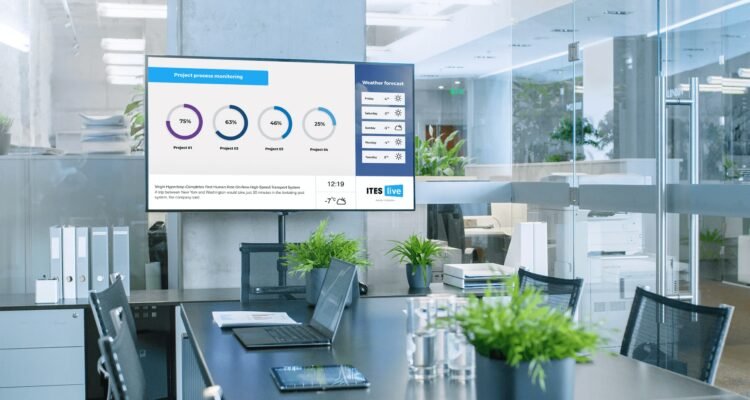
Walk into almost any modern business and you will notice something. Screens are everywhere. They sit behind counters at fast food restaurants, hang in hospital waiting rooms, light up retail store walls, and greet visitors in hotel lobbies. But the screens themselves are just hardware. The real power behind what you see on those displays comes from digital signage software working quietly in the background.
If you have ever wondered how businesses keep their screens updated without sending someone physically to each location, or how a coffee shop changes its entire menu overnight across dozens of branches, the answer is always the same. Good software makes it possible.
This blog breaks down exactly what digital signage software is, how it works, what problems it solves, and why businesses of every size are switching from static print materials to dynamic screen content managed through a central platform.
Printed posters, vinyl banners, and foam board displays served businesses well for decades. But they come with serious limitations that most business owners feel before they can name them.
You print a promotional flyer with a sale price. Then the sale ends, or the price changes, and suddenly every location has outdated information on the wall. You pay for a new print run. You pay for shipping. You pay for staff time to swap out materials. And by the time everything is updated, a new promotion has already started.
This cycle wastes money, time, and consistency across locations. It also leaves customers seeing information that no longer applies to them, which damages trust.
Digital signage software solves this entire chain of problems in one move. You update content from one dashboard, publish it to every screen across every location simultaneously, and the change goes live in seconds.
At its core, digital signage software is a content management system built specifically for screens. It lets you create, schedule, and push visual content to any display connected to your signage network.
The best platforms, including EZ-AD TV, give you a cloud based workspace where you can design layouts, upload media files, organize content into playlists, and assign those playlists to specific screens or groups of screens. You do not need to be physically present at any location to manage what is showing on a display miles away.
Here is what a typical workflow looks like using digital signage software.
You log into your account from any device. You open the content editor and build a new slide or upload an existing image or video. You schedule that content to play at a specific time, on specific days, for a specific duration. You assign it to one screen, a group of screens, or all screens in your network. You hit publish, and it goes live automatically according to your schedule.
That is the core function. But modern signage platforms go far beyond basic scheduling.
Not all screen management software offers the same capabilities. When evaluating any platform, these are the features that actually matter for day to day business use.
Content Scheduling and Playlist Management
Being able to schedule different content for different times of day is one of the most practical features available. A restaurant can show breakfast promotions in the morning, lunch specials at midday, and happy hour deals in the afternoon, all automatically. No manual intervention is needed once the schedule is set up.
Playlist management lets you group multiple pieces of content and define how long each one plays before transitioning to the next. This keeps screens dynamic and engaging without requiring constant attention.
Remote Screen Management
One of the biggest advantages of cloud based digital signage software is the ability to manage every screen in your network from a single dashboard. Whether you have two screens in one store or two hundred screens across multiple cities, you control everything from one place.
This is especially valuable for franchise owners, retail chains, and businesses with multiple locations. An update you make at your desk appears on screens everywhere within moments.
Template Based Design Tools
Not every business has a dedicated graphic designer. The better digital signage platforms include template libraries and drag and drop editors that let anyone create professional looking content without design experience.
This removes a major barrier for small businesses that want to maintain a consistent, polished visual identity across their displays without hiring outside help.
Real Time Content Updates
Some messages cannot wait. A sudden weather delay, a limited time offer, an emergency notification, or a breaking announcement needs to go up immediately. Digital signage software allows real time publishing that bypasses any waiting period. You make the change, you publish it, and it is live.
Multi Zone Screen Layouts
Instead of showing one piece of content at a time, multi zone layouts let you divide a screen into sections. You might show promotional content on the left side, a social media feed in the upper right corner, and a live news ticker at the bottom. All of this runs simultaneously from the same platform.
While virtually any business with screens can benefit from a solid content management system, certain industries see the most direct impact.
Restaurants and food service businesses use digital menu boards to update prices, add seasonal items, and highlight specials without printing new menus. Healthcare facilities use patient facing screens to display wait times, health tips, and wayfinding information. Retail stores run promotional campaigns, showcase new arrivals, and direct shoppers to different departments. Corporate offices use internal screens for company announcements, meeting schedules, and performance dashboards. Schools and universities keep students informed about events, deadlines, and safety notices.
In each of these environments, the common thread is the need to deliver timely, relevant, and location specific information to an audience that is already present and paying attention.
Some older digital signage systems relied on locally installed software or physical media like USB drives to push content to screens. While those methods still exist, cloud based digital signage software has become the clear standard for most businesses.
With a cloud platform, there is nothing to install on individual computers. Updates to the software itself happen automatically without disrupting your operations. You can access your account and manage screens from any device with an internet connection. Your content and scheduling data are stored securely and backed up without you needing to maintain any local infrastructure.
For businesses that are growing or managing screens across multiple sites, cloud access makes scaling effortless. Adding a new location to your signage network is as simple as connecting a new player device to the platform and assigning it to the right content group.
EZ-AD TV was built around the idea that managing digital displays should not require technical expertise or a large budget. The platform is designed to be approachable for business owners who want professional results without a steep learning curve.
Users get access to a clean content management workspace where building and scheduling screen content is straightforward. The system supports a wide range of media formats and integrates easily with the screen hardware businesses already have or plan to install. Whether you are running a single screen in a small storefront or managing a large signage network across multiple locations, the platform scales with your needs.
The focus is on giving real businesses the tools to communicate more effectively with the people already in front of their screens.
How difficult is it to get started?
Most modern platforms, including EZ-AD TV, are designed for setup without technical support. You connect your player device, log into the software, and start building content. Many businesses are up and running within a day.
Do you need internet access for every screen?
Yes, for cloud based digital signage software to function fully, each screen needs a reliable internet connection. However, some platforms offer offline playback that allows screens to continue showing cached content if the connection is temporarily interrupted.
Is it expensive?
Pricing varies widely depending on the platform and the number of screens. Compared to the ongoing cost of printing and distributing physical signage materials, most businesses find that digital signage software pays for itself quickly through reduced print costs and labor savings alone.
Digital signage software is not a luxury reserved for large corporations or tech savvy businesses. It is a practical, accessible tool that gives any business the ability to communicate clearly, consistently, and efficiently through the screens they already use.
The shift away from static printed materials toward dynamic, remotely managed screen content is not a trend. It is a permanent change in how businesses present information to customers, employees, and visitors. The businesses that adopt good digital signage software early are the ones building more flexible, responsive communication systems for the long term.
If your screens are currently running on outdated content, disconnected from a central system, or requiring manual updates at each location, it is worth exploring what a platform like EZ-AD TV can do for your operations.

